
Bridging the Gap Between Thought and Action: The Model Context Protocol (MCP)
In the rapid evolution of Artificial Intelligence, a persistent wall has stood between Large Language Models (LLMs) and the real world. Despite their vast reasoning capabilities, LLMs have historically been "locked in a room"-brilliant at explaining how a network protocol works, but physically unable to ping a server or query a database themselves. Integrating these models into private environments has traditionally required a fragile web of bespoke "glue code" that is difficult to maintain and nearly impossible to scale.
In November 2024, Anthropic released the Model Context Protocol (MCP) to tear down this wall. MCP is the standardized "nervous system" that connects the brain (the LLM) over to the hands (the Tools).
The Architecture of Autonomy
The true power of MCP lies in its ability to act as the "USB-C for AI"-a universal, open-source standard that allows any AI model to securely plug into any local or remote data source. As demonstrated in our example codebase, the system architecture is built on a clean separation of concerns:
1. The Orchestrator (MCP Client)
The Client acts as a skilled translator, talking to the LLM and the Server simultaneously. It listens to what the LLM wants to do and pulls the right lever on the Server to make it happen. In this implementation, the ChatService coordinates user input, manages tool selection via the Official MCP Python SDK, and handles SSE (Server-Sent Events) transport for robust communication.
2. The Capability Provider (MCP Server)
The Server is the toolbox; it doesn't need to know why a tool is being called, only how to execute it perfectly. By using FastMCP, developers can expose native functions-like network pings or NTP time checks-as standardized tools that are discoverable by the AI.
3. The Reasoning Engine (Local LLM)
Utilizing models like Qwen2.5-7B via Ollama, the system gains a reasoning layer that excels at instruction-following. The model analyzes the user's intent, reviews the available tool schemas provided by the MCP server, and decides which action to take.
From "Processing Data" to "Actioning Tasks"
The transition to MCP represents a fundamental shift in application development. Traditionally, developers wrote Linear Logic:
User Question → LLM Reasoning → Tool Selection → MCP Server Execution → Context Return → LLM Synthesis → User Response
The Anatomy of an Interaction
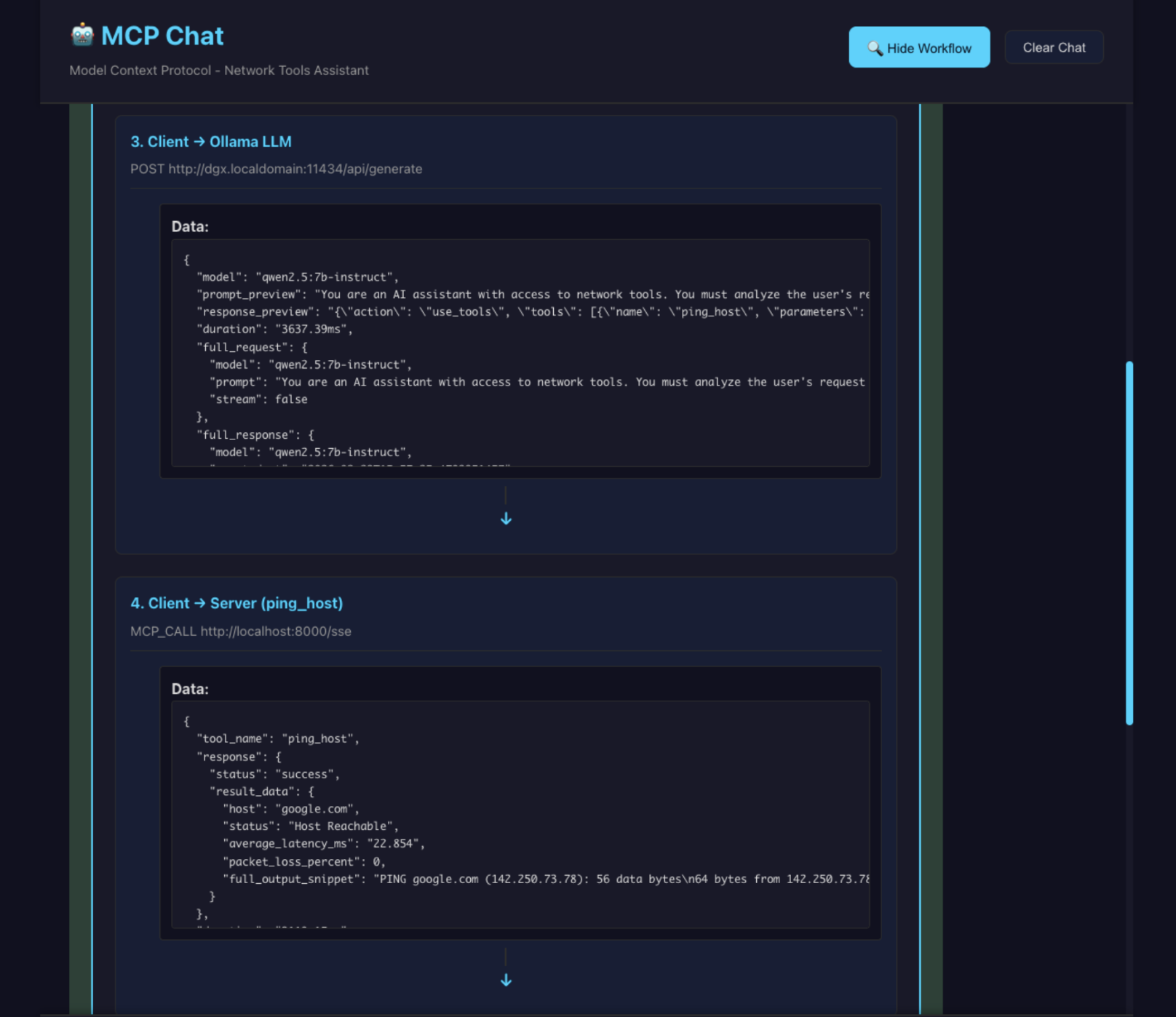
When a user asks, "Is google.com responding quickly?", the React UI in this codebase visualizes a precise 6-step handshake:
Intent: The UI captures the request: "can you ping google.com".
Discovery: The Client sends the prompt plus JSON schemas for all available tools to the LLM.
The Decision: The LLM realizes it needs network data and responds with a structured tool call: {"action": "use_tools", "tools": [{"name": "ping_host", "parameters": {"hostname": "google.com"}}]}.
The Action: The Client forwards this to the MCP Server, which executes a native system ping and returns raw data.
Integration: The Client sends that raw network data back to the LLM.
Synthesis: The LLM interprets the result and generates a conversational response: "Yes, google.com is reachable with an average latency of 22ms".
The Power of Custom, Private Integration
While public MCP connectors exist for tools like Slack or Google Drive, the real revolution is happening inside the firewall. Most organizations possess "Digital Dark Matter"-vast amounts of data locked in private CRMs, internal telemetry tools, and legacy databases.
By creating Custom MCP Servers, developers can illuminate this data. Instead of hard-coding every possible query path, you give the LLM a "window" into your internal systems. Because the protocol is model-agnostic, you can swap your reasoning engine from a local Ollama instance to a cloud-based model without changing a single line of your tool-integration code.
Deep Dive: Defining Custom Capabilities with FastMCP
The core strength of our implementation is how easily a developer can grant an AI "agentic" powers. Using the FastMCP framework, adding a new tool is as simple as writing a Python function with clear type hints and docstrings.
When you define a tool, the MCP server automatically generates the JSON schema that the LLM uses for reasoning. Here* is how the ping_host capability is structured to enable the interaction seen in our UI:
*view on a desktop device for best results
@mcp.tool()
async def ping_host(hostname: str) -> dict:
    """
    Ping a host to check connectivity and latency.
    Args:
        hostname: The domain name or IP address to ping.
    """
    # Native Python/OS logic to execute the ping
    # Returns a dictionary that the LLM will interpret
Why this works:
Self-Documenting: The docstring becomes the "manual" the LLM reads to understand when to use the tool.
Type Safety: The LLM respects the hostname: str requirement, reducing malformed requests.
Transparent Execution: The UI displays the raw data returned by this function before the LLM summarizes it, providing a full audit trail of the agent's actions.
Key Takeaways for Developers
Decoupled Intelligence: Separate your reasoning engine (LLM) from your execution logic (MCP Server) to enable "plug-and-play" capabilities.
Security by Design: The LLM never has direct system access; it only requests tools that the Server has explicitly permitted and validated.
Zero-Instruction Scaling: Add 100 new tools to your server, and the LLM will automatically discover and use them without requiring new prompt engineering.
Standardized Connectivity: Use standard SSE transport to ensure your server can talk to any MCP-compliant client in the world.